Overview
构建agent的难点在于使他们足够可靠 即时他们在原型阶段往往会表现得很好
Why do agent fails
LLM调用采取了错误的措施或者没有按照预期执行,原因:
- LLM能力不够
- 正确的context没有传递给LLM
更多情况是后者
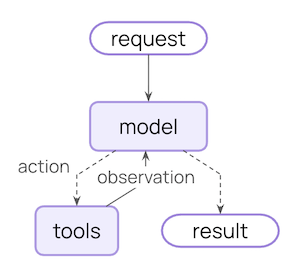
The agent loop
two main step2:
- Model call: calls the LLM with a prompt and available tools, returns either a response or a request to execute tools
- Tool execution: execute the tools that LLM requested,returns tool results
What can you control:
| Context Type | What You Control | Transient or Persistent |
|---|---|---|
| Model Context | What goes into model calls (instructions, message history, tools, response format) | Transient |
| Tool Context | What tools can access and produce (reads/writes to state, store, runtime context) | Persistent |
| Life-cycle Context | What happens between model and tool calls (summarization, guardrails, logging, etc.) | Persistent |
Data sources
| Data Source | Also Known As | Scope | Examples |
|---|---|---|---|
| Runtime Context | Static configuration | Conversation-scoped | User ID, API keys, database connections, permissions, environment settings |
| State | Short-term memory | Conversation-scoped | Current messages, uploaded files, authentication status, tool results |
| Store | Long-term memory | Cross-conversation | User preferences, extracted insights, memories, historical data |
How it works
Using middleware:
- update context
- Jump to a different step in the agent lifecycle
Model context
Instructions,available tools,which model to use,output format.
- System prompt
- Messages:conversation history
- Tools
- Model
- Response format
System prompt
Successful agents draw on memories, preferences, and configuration to provide the right instructions for the current state of the conversation.
- Access message count or conversation context from state
- Access user preferences from long-term memory
- Access user ID or configuration from Runtime Context
Message
Make up the prompt that is sent to the LLM
分为state,store,Runtime context
Tools
Defining tools
name,description(docstring),argument name, argument description
| |
Selecting tools
从分为从三个数据源来组织上下文
Model
根据三种数据源中的各种数据来选择合适的模型
Response format
defining formats
Schema definitions guide the model. Field names, types, and descriptions specify exactly what format the output should adhere to.
| |
selecting format
Tool context
Both read and write context
Reads
大多数的工具不只是需要LLM传入的参数,需要从其他的数据源获得,主要是state,store,Runtime context
Writes
update the memory
- Write to State to track session-specific information using Command:
- Write to Store to persist data across sessions:
Life-cycle context
控制核心agent步骤之间发生的情况:拦截数据流以实现总结,安全护栏,日志记录等横切关注点
使用middleware:
- update context:修改state和存储以持久化更改,更新对话历史或者保存insights
- Jump in the lifecycle:根据上下文移动到Agent loop中的不同步骤(例如如果满足条件就跳过工具执行,或使用修改后的上下文重复model call)
Example: Summarization
automatically condensing conversation history
LangChain offers built-in middleware for this:
| |
When the conversation exceeds the token limit, SummarizationMiddleware automatically:
- Summarizes older messages using a separate LLM call
- Replaces them with a summary message in State (permanently)
- Keeps recent messages intact for context