兼容性#
- 状态: Beta
- Beta header:
compact-2026-01-12 - ZDR: 符合条件(不含 Covered Models)
- 支持的模型:
claude-fable-5-1, claude-mythos-5-1, claude-fable-5, claude-mythos-5, claude-mythos-preview, claude-opus-5, claude-opus-4-8, claude-opus-4-7, claude-opus-4-6, claude-sonnet-5, claude-sonnet-4-6 - 平台: Claude API (beta), Claude Platform on AWS (beta), Amazon Bedrock (beta), Google Cloud (beta), Microsoft Foundry (beta)
服务端压缩是管理长时间运行对话和 agentic 工作流中上下文的推荐策略。它会自动处理上下文管理,无需客户端摘要代码。压缩通过在接近上下文窗口上限时自动摘要较旧的上下文,来延长长时间运行对话和任务的有效上下文长度。它也会保持活动上下文较小:随着对话增长,回复质量会下降,因此压缩会用简洁摘要替换较旧内容。
关于长上下文为何会退化以及压缩如何提供帮助的更深入讨论,见 [Effective context engineering](https://www.anthropic.com/engineering/effective-context-engineering-for-ai-agents)。适用于:
- 基于聊天的多轮对话,希望用户长时间使用同一会话
- 需要大量后续工作(通常是工具调用)且可能超出上下文窗口的面向任务的 prompt
压缩如何工作#
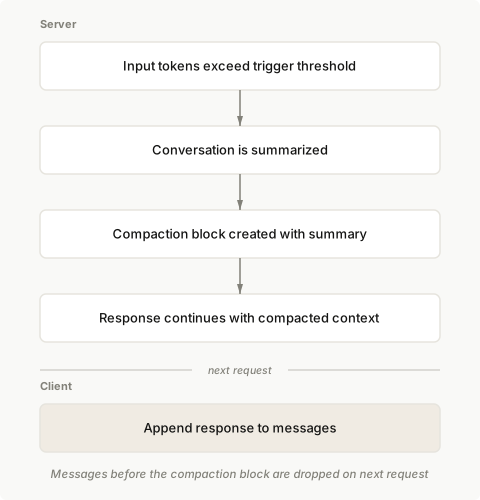
启用压缩后,当对话达到所配置的 token 阈值时,Claude 会自动对对话进行摘要。API 会:
- 检测输入 tokens 何时达到你指定的触发阈值。
- 生成当前对话的摘要。
- 创建包含该摘要的
compaction block。 - 使用压缩后的上下文继续回复。
在后续请求中,将响应追加到你的 messages。API 会自动丢弃 compaction block 之前的所有 content block,并从摘要处继续对话。
基本用法#
通过在 Messages API 请求的 context_management.edits 中添加 compact_20260112 策略来启用压缩。
 1
 2
 3
 4
 5
 6
 7
 8
 9
10
11
12
13
14
| client = anthropic.Anthropic()
messages = [{"role": "user", "content": "Help me build a website"}]
response = client.beta.messages.create(
betas=["compact-2026-01-12"],
model="claude-opus-5",
max_tokens=4096,
messages=messages,
context_management={"edits": [{"type": "compact_20260112"}]},
)
# Append the response (including any compaction block) to continue the conversation
messages.append({"role": "assistant", "content": response.content})
|
| 参数 | 类型 | 默认值 | 说明 |
|---|
type | string | Required | 必须为 "compact_20260112" |
trigger | object | {"type": "input_tokens", "value": 150000} | 何时触发压缩。input_tokens 是唯一支持的触发类型。value 必须至少为 50,000 tokens。 |
pause_after_compaction | boolean | false | 生成压缩摘要后是否暂停 |
instructions | string | null | 自定义摘要 prompt。提供后会完全替换默认 prompt。 |
触发配置#
使用 trigger 参数配置何时触发压缩:
 1
 2
 3
 4
 5
 6
 7
 8
 9
10
11
12
13
14
15
16
| client = anthropic.Anthropic()
messages = [{"role": "user", "content": "Hello, Claude"}]
response = client.beta.messages.create(
betas=["compact-2026-01-12"],
model="claude-opus-5",
max_tokens=4096,
messages=messages,
context_management={
"edits": [
{
"type": "compact_20260112",
"trigger": {"type": "input_tokens", "value": 150000},
}
]
},
)
|
自定义摘要指令#
默认摘要 prompt 因模型而异。各默认 prompt 都指示 Claude 在 <summary></summary> 标签内撰写摘要,并包含在未来上下文窗口中继续任务所需的信息。例如,部分模型使用以下 prompt:
1
| You have written a partial transcript for the initial task above. Please write a summary of the transcript. The purpose of this summary is to provide continuity so you can continue to make progress towards solving the task in a future context, where the raw history above may not be accessible and will be replaced with this summary. Write down anything that would be helpful, including the state, next steps, learnings etc. You must wrap your summary in a <summary></summary> block.
|
可通过 instructions 参数提供自定义指令。自定义指令不会补充默认 prompt,而是完全替换它:
 1
 2
 3
 4
 5
 6
 7
 8
 9
10
11
12
13
14
15
16
| client = anthropic.Anthropic()
messages = [{"role": "user", "content": "Hello, Claude"}]
response = client.beta.messages.create(
betas=["compact-2026-01-12"],
model="claude-opus-5",
max_tokens=4096,
messages=messages,
context_management={
"edits": [
{
"type": "compact_20260112",
"instructions": "Focus on preserving code snippets, variable names, and technical decisions.",
}
]
},
)
|
在 Claude Fable 5.1 和 Claude Mythos 5.1 上,带自定义 instructions 的请求仅从可见对话进行摘要:更早的 thinking block 不在摘要器的输入中。
压缩后暂停#
使用 pause_after_compaction 在生成压缩摘要后暂停 API。这使你可以在 API 继续生成回复之前添加额外的 content block(例如保留最近的消息或特定的指令导向消息)。
启用后,API 在生成 compaction block 后会返回带 compaction stop reason 的消息:
 1
 2
 3
 4
 5
 6
 7
 8
 9
10
11
12
13
14
15
16
17
18
19
20
21
22
23
24
25
| client = anthropic.Anthropic()
messages = [{"role": "user", "content": "Hello, Claude"}]
response = client.beta.messages.create(
betas=["compact-2026-01-12"],
model="claude-opus-5",
max_tokens=4096,
messages=messages,
context_management={
"edits": [{"type": "compact_20260112", "pause_after_compaction": True}]
},
)
# Check if compaction triggered a pause
if response.stop_reason == "compaction":
# Response contains only the compaction block
messages.append({"role": "assistant", "content": response.content})
# Continue the request
response = client.beta.messages.create(
betas=["compact-2026-01-12"],
model="claude-opus-5",
max_tokens=4096,
messages=messages,
context_management={"edits": [{"type": "compact_20260112"}]},
)
|
强制执行总 token 预算#
当模型处理带有多次工具调用迭代的长任务时,总 token 消耗可能显著增长。你可以将 pause_after_compaction 与压缩计数器结合,以估算累计用量,并在达到预算后优雅地收尾任务。
此示例仅出现在 SDK 语言中:其价值在于请求周围的预算跟踪逻辑。原始请求将 触发配置 中的 trigger 与 压缩后暂停 中的 pause_after_compaction 结合。
```python Python
client = anthropic.Anthropic()
messages = [{"role": "user", "content": "Hello, Claude"}]
TRIGGER_THRESHOLD = 100_000
TOTAL_TOKEN_BUDGET = 3_000_000
n_compactions = 0response = client.beta.messages.create(
betas=[“compact-2026-01-12”],
model=“claude-opus-5”,
max_tokens=4096,
messages=messages,
context_management={
“edits”: [
{
“type”: “compact_20260112”,
“trigger”: {“type”: “input_tokens”, “value”: TRIGGER_THRESHOLD},
“pause_after_compaction”: True,
}
]
},
)
if response.stop_reason == “compaction”:
n_compactions += 1
messages.append({“role”: “assistant”, “content”: response.content})
  # Estimate total tokens consumed; prompt wrap-up if over budget
  if n_compactions * TRIGGER_THRESHOLD >= TOTAL_TOKEN_BUDGET:
      messages.append(
          {
              "role": "user",
              "content": "Please wrap up your current work and summarize the final state.",
          }
      )
 1
 2
 3
 4
 5
 6
 7
 8
 9
10
11
12
13
14
15
16
17
18
19
20
21
22
|
</CodeGroup>

## 处理 `compaction` block

触发压缩时,API 会在 assistant 回复的开头返回一个 `compaction` block。

长时间运行的对话可能发生多次压缩。最后一个 `compaction` block 反映 prompt 的最终状态,用生成的摘要替换其之前的内容。

```json Output
{
"content": [
  {
    "type": "compaction",
    "content": "Summary of the conversation: The user requested help building a web scraper..."
  },
  {
    "type": "text",
    "text": "Based on our conversation so far..."
  }
]
}
|
回传 compaction block#
你必须在后续请求中将 compaction block 传回 API,才能以缩短后的 prompt 继续对话。最简单的做法是将整个响应 content 追加到你的 messages:
 1
 2
 3
 4
 5
 6
 7
 8
 9
10
11
12
13
14
15
16
17
18
19
20
21
22
| client = anthropic.Anthropic()
messages = [{"role": "user", "content": "Hello, Claude"}]
response = client.beta.messages.create(
betas=["compact-2026-01-12"],
model="claude-opus-5",
max_tokens=4096,
messages=messages,
context_management={"edits": [{"type": "compact_20260112"}]},
)
# After receiving a response with a compaction block
messages.append({"role": "assistant", "content": response.content})
# Continue the conversation
messages.append({"role": "user", "content": "Now add error handling"})
response = client.beta.messages.create(
betas=["compact-2026-01-12"],
model="claude-opus-5",
max_tokens=4096,
messages=messages,
context_management={"edits": [{"type": "compact_20260112"}]},
)
|
当 API 收到 compaction block 时,其之前的所有 content block 都会被忽略。你可以:
- 在列表中保留原始 messages,让 API 处理移除已压缩的内容
- 手动丢弃已压缩的消息,只保留从
compaction block 起的内容
在 Claude Fable 5.1 和 Claude Mythos 5.1 上,compaction block 之前的 thinking block 不会被带入后续上下文,因此摘要是模型对那部分早期工作的全部依据。如果你编写自己的 instructions,需告知模型摘要必须保留什么;见 Tell the model what to preserve in compaction summaries。
流式输出#
compaction block 的流式传输方式与 text block 不同。你会收到一个 content_block_start 事件,随后是一条包含完整摘要内容的 content_block_delta(无中间流式片段),然后是 content_block_stop 事件。
 1
 2
 3
 4
 5
 6
 7
 8
 9
10
11
12
13
14
15
16
17
18
19
20
21
22
23
24
25
26
| client = anthropic.Anthropic()
messages = [{"role": "user", "content": "Hello, Claude"}]
with client.beta.messages.stream(
betas=["compact-2026-01-12"],
model="claude-opus-5",
max_tokens=4096,
messages=messages,
context_management={"edits": [{"type": "compact_20260112"}]},
) as stream:
for event in stream:
if event.type == "content_block_start":
if event.content_block.type == "compaction":
print("Compaction started...")
elif event.content_block.type == "text":
print("Text response started...")
elif event.type == "content_block_delta":
if event.delta.type == "compaction_delta":
print(f"Compaction complete: {len(event.delta.content or '')} chars")
elif event.delta.type == "text_delta":
print(event.delta.text, end="", flush=True)
# Get the final accumulated message
message = stream.get_final_message()
messages.append({"role": "assistant", "content": message.content})
|
提示缓存#
压缩与 提示缓存 配合良好。你可以在 compaction block 上添加 cache_control 断点,以缓存摘要后的内容。
 1
 2
 3
 4
 5
 6
 7
 8
 9
10
11
12
13
14
| {
"role": "assistant",
"content": [
{
"type": "compaction",
"content": "[summary text]",
"cache_control": { "type": "ephemeral" }
},
{
"type": "text",
"text": "Based on our conversation..."
}
]
}
|
通过 system prompt 最大化缓存命中#
发生压缩时,摘要会成为需要写入缓存的新内容。如果没有额外的缓存断点,这还会使任何已缓存的 system prompt 失效,从而需要将其与压缩摘要一起重新缓存。
为最大化缓存命中率,在 system prompt 末尾添加一个 cache_control 断点。这会使 system prompt 与对话分开缓存,因此发生压缩时:
- system prompt 缓存仍然有效,并从缓存读取
- 只需将压缩摘要作为新的缓存条目写入
 1
 2
 3
 4
 5
 6
 7
 8
 9
10
11
12
13
14
15
16
17
18
| client = anthropic.Anthropic()
messages = [{"role": "user", "content": "Hello, Claude"}]
response = client.beta.messages.create(
betas=["compact-2026-01-12"],
model="claude-opus-5",
max_tokens=4096,
system=[
{
"type": "text",
"text": "You are a helpful coding assistant...",
"cache_control": {
"type": "ephemeral"
}, # Cache the system prompt separately
}
],
messages=messages,
context_management={"edits": [{"type": "compact_20260112"}]},
)
|
这使较长的 system prompt 在整个对话的多次压缩事件中保持缓存。
了解用量#
压缩需要额外的采样步骤,该步骤计入速率限制和计费。API 会在响应中返回详细的用量信息:
 1
 2
 3
 4
 5
 6
 7
 8
 9
10
11
12
13
14
15
16
17
18
| {
"usage": {
"input_tokens": 23000,
"output_tokens": 1000,
"iterations": [
{
"type": "compaction",
"input_tokens": 180000,
"output_tokens": 3500
},
{
"type": "message",
"input_tokens": 23000,
"output_tokens": 1000
}
]
}
}
|
iterations 数组显示每次采样迭代的用量。发生压缩时,你会看到一次 compaction 迭代,随后是主要的 message 迭代。在此示例中,顶层的 input_tokens 和 output_tokens 与 message 迭代完全一致,因为只有一次非压缩迭代。最后一次迭代的 token 计数反映压缩后的有效上下文大小。
顶层的 `input_tokens` 和 `output_tokens` 不包含压缩迭代的用量。它们反映所有非压缩迭代的总和。要计算一次请求消耗并计费的总 tokens,请对 `usage.iterations` 数组中的所有条目求和。如果你此前依赖 usage.input_tokens 和 usage.output_tokens 进行成本跟踪或审计,在启用压缩后需要更新跟踪逻辑,改为对 usage.iterations 进行汇总。启用压缩 beta 后,每个响应都包含 usage.iterations,即使未发生压缩。仅当请求期间触发了新的压缩时,才会出现 compaction 条目。重新应用先前的 compaction block 不会产生额外的压缩费用,此时顶层用量字段仍然准确。
与其他功能结合#
服务端工具#
使用服务端工具(例如 web search)时,会在每次采样迭代开始时检查压缩触发条件。根据触发阈值和生成的输出量,单次请求内可能发生多次压缩。
Token 计数#
token 计数端点(/v1/messages/count_tokens)会应用 prompt 中已有的 compaction block,但不会触发新的压缩。用它来检查先前压缩后的有效 token 数:
 1
 2
 3
 4
 5
 6
 7
 8
 9
10
11
| client = anthropic.Anthropic()
messages = [{"role": "user", "content": "Hello, Claude"}]
count_response = client.beta.messages.count_tokens(
betas=["compact-2026-01-12"],
model="claude-opus-5",
messages=messages,
context_management={"edits": [{"type": "compact_20260112"}]},
)
print(f"Current tokens: {count_response.input_tokens}")
print(f"Original tokens: {count_response.context_management.original_input_tokens}")
|
以下是一个带压缩的长时间运行对话的完整示例:
 1
 2
 3
 4
 5
 6
 7
 8
 9
10
11
12
13
14
15
16
17
18
19
20
21
22
23
24
25
26
27
28
29
30
31
32
33
34
35
| client = anthropic.Anthropic()
messages: list[dict] = []
def chat(user_message: str) -> str:
messages.append({"role": "user", "content": user_message})
response = client.beta.messages.create(
betas=["compact-2026-01-12"],
model="claude-opus-5",
max_tokens=4096,
messages=messages,
context_management={
"edits": [
{
"type": "compact_20260112",
"trigger": {"type": "input_tokens", "value": 100000},
}
]
},
)
# Append response (compaction blocks are automatically included)
messages.append({"role": "assistant", "content": response.content})
# Return the text content
return next(block.text for block in response.content if block.type == "text")
# Run a long conversation
print(chat("Help me build a Python web scraper"))
print(chat("Add support for JavaScript-rendered pages"))
print(chat("Now add rate limiting and error handling"))
# Continue calling chat() for as long as the conversation needs
|
在 Claude Fable 5.1 上,从你在 compaction block 之后重新插入的任何 assistant turn 中移除 thinking 和 redacted_thinking block,或随 thinking-binding-controls-2026-08-01 beta header 发送 thinking.block_binding.prefix_mismatch_behavior: "drop_block"。这些 block 是在完整历史存在时生成的,因此不再通过 conversation check。在强制执行该检查的地方,继续请求会以 400 错误被拒绝。保留的 text 和 tool block 可以保持原样。让 API 摘要全部内容、而不重新插入更早的 turn,可避免此问题。
以下示例使用 pause_after_compaction 原样保留上一轮往来和当前 user message(共三条消息),而不是对它们进行摘要:
 1
 2
 3
 4
 5
 6
 7
 8
 9
10
11
12
13
14
15
16
17
18
19
20
21
22
23
24
25
26
27
28
29
30
31
32
33
34
35
36
37
38
39
40
41
42
43
44
45
46
47
48
49
50
51
52
53
54
55
56
57
58
59
60
61
62
63
64
65
66
| from typing import Any
client = anthropic.Anthropic()
messages: list[dict[str, Any]] = []
def chat(user_message: str) -> str:
messages.append({"role": "user", "content": user_message})
response = client.beta.messages.create(
betas=["compact-2026-01-12"],
model="claude-opus-5",
max_tokens=4096,
messages=messages,
context_management={
"edits": [
{
"type": "compact_20260112",
"trigger": {"type": "input_tokens", "value": 100000},
"pause_after_compaction": True,
}
]
},
)
# Check if compaction occurred and paused
if response.stop_reason == "compaction":
# Get the compaction block from the response
compaction_block = response.content[0]
# Preserve the prior exchange + current user message (3 messages)
# by including them after the compaction block
preserved_messages = messages[-3:] if len(messages) >= 3 else messages
# Build new message list: compaction + preserved messages
new_assistant_content = [compaction_block]
messages_after_compaction = [
{"role": "assistant", "content": new_assistant_content}
] + preserved_messages
# Continue the request with the compacted context + preserved messages
response = client.beta.messages.create(
betas=["compact-2026-01-12"],
model="claude-opus-5",
max_tokens=4096,
messages=messages_after_compaction,
context_management={"edits": [{"type": "compact_20260112"}]},
)
# Update the message list to reflect the compaction
messages.clear()
messages.extend(messages_after_compaction)
# Append the final response
messages.append({"role": "assistant", "content": response.content})
# Return the text content
return next(block.text for block in response.content if block.type == "text")
# Run a long conversation
print(chat("Help me build a Python web scraper"))
print(chat("Add support for JavaScript-rendered pages"))
print(chat("Now add rate limiting and error handling"))
# Continue calling chat() for as long as the conversation needs
|
当前限制#
摘要使用同一模型: 请求中指定的模型会用于摘要。无法选择用另一个(例如更便宜的)模型来生成摘要。
定义了 tools 时压缩可能失败: 当请求包含 tools 时,模型偶尔会在内部摘要步骤中调用工具,而不是撰写摘要。发生这种情况时,响应会包含一个 content: null 的 compaction block。为防止此问题,将 instructions 设为明确告知模型不要调用工具的 prompt,例如:
1
| Summarize the transcript inside <summary></summary> tags. Include relevant information in the summary for continuing the task in the next context window. Do not call any tools while writing this summary; respond with text only.
|
后续步骤#
随着对话增长,使用上下文编辑自动管理对话上下文。
了解上下文窗口大小和管理策略。
探索一个实用实现:使用后台线程和提示缓存,通过即时 session memory 压缩管理长时间运行的对话。