Context windows
Understand how the context window works, how extended thinking and tool use count toward it, and how to manage context as conversations grow.
the primary strategy is server-side-compaction
How the context window works
what is the context window:
The “context window” refers to all the text a language model can reference when generating a response, including the response itself. https://platform.claude.com/docs/images/context-window.svg
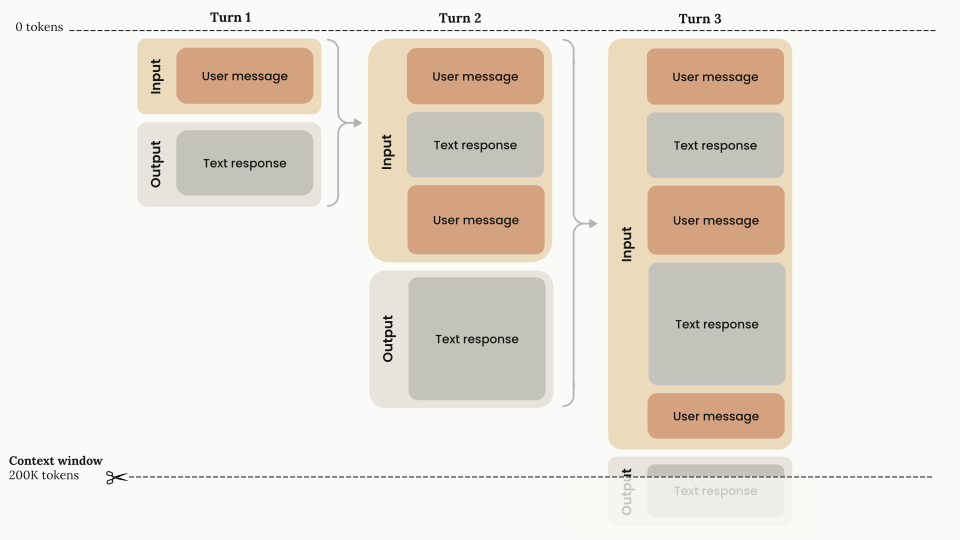
As token count grows, accuracy and recall degrade, a phenomenon known as context rot.
Chat interfaces manage the context window on a rolling “first in,first out “basis
- Progressive token accumulation: user message and assistant response accumulates within the context window and previous is preserved
- Context window capacity:
- Input-Output flow: Each turn consists of
- input phase
- output phase
Everything in the turns counts:
- the system prompt,every message in messages(including tool results,images, and documents) and your tool definition
- the output LLM generates, including the extended thinking
If you use prompt caching, the input count is split across input_tokens, cache_read_input_tokens, and cache_creation_input_tokens
Context window sizes by model
the max length of context window is up to the model
The context window with thinking
Thinking tokens are a subset of your max_tokens parameter, are billed as output tokens .
Whether thinking blocks from previous assistant turns stay in the context window depends on the model.
Most of LLMs keep previous thinking blocks by default, and they count toward the context window like any other input tokens.
The following diagram shows how tokens are managed when thinking is enabled on a model that strips previous thinking blocks: https://platform.claude.com/docs/images/context-window-thinking.svg
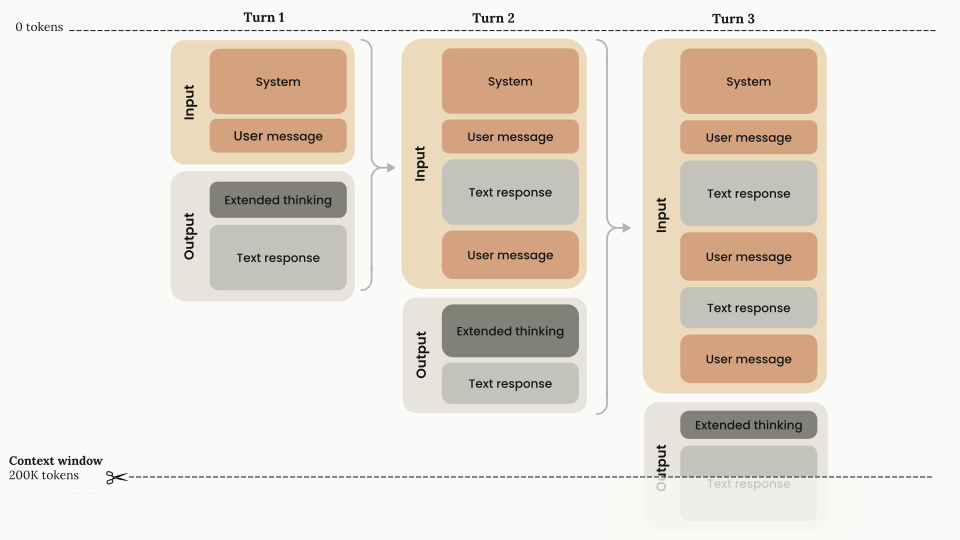
Billing: Thinking tokens are billed as output tokens once, when they are generated. On models that keep previous thinking blocks, the kept blocks are then part of later requests’ input and are billed as input tokens, like the rest of the conversation history.
The context with thinking and tool use
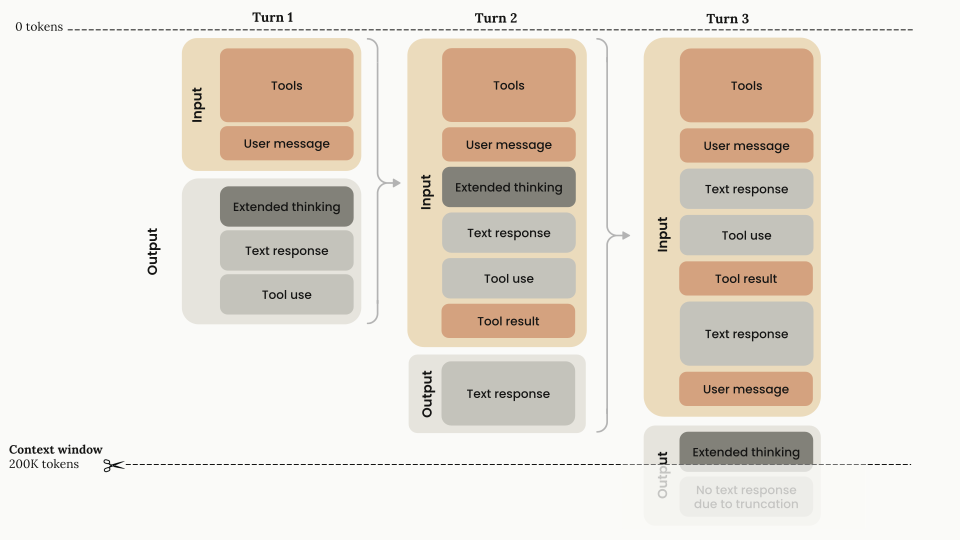
The following diagram illustrates how tokens are managed when you combine thinking with tool use on a model that strips previous thinking blocks: https://platform.claude.com/docs/images/context-window-thinking-tools.svg
A little bit different from my previous thought
First turn architecture
- Input components: Tools configuration and user message
- Output components: Thinking + text response + tool use request
- Token calculation: All input and output components count toward the context window, and all output components are billed as output tokens.
Tool result handling (turn 2)
- Input components: Every block in the first turn and the
tool_result. You must return the thinking block with the corresponding tool results. This is the only case where you have to return thinking blocks. - Output components: After tool results have been passed back to Claude, Claude responds with only text (no additional thinking until the next
usermessage, unless interleaved thinking is enabled). - Token calculation: All input and output components count toward the context window, and all output components are billed as output tokens.
- Input components: Every block in the first turn and the
New user turn (turn 3)
- Input components: All inputs and the output from the previous turn are carried forward. The thinking block from the completed tool use cycle no longer has to stay in context: on models that strip previous thinking blocks, the API drops it automatically when you pass it back, and on models that keep previous thinking blocks, it stays unless you clear it with thinking block clearing. This is also where you add the next
userturn. - Output components: Because there is a new
userturn outside the tool use cycle, Claude generates a new thinking block and continues from there. - Token calculation: On models that strip previous thinking blocks, the previous thinking tokens no longer count toward the context window. All other previous blocks still count toward the context window, as does the thinking block in the current
assistantturn.
- Input components: All inputs and the output from the previous turn are carried forward. The thinking block from the completed tool use cycle no longer has to stay in context: on models that strip previous thinking blocks, the API drops it automatically when you pass it back, and on models that keep previous thinking blocks, it stays unless you clear it with thinking block clearing. This is also where you add the next
Interleaved thinking:
Let LLMs think between tool calls.,including after it receives tool results
Context awareness
these models track their remaining context window (their “token budget”) throughout a conversation.
How it works
In the system prompt of every request, the API gives Claude its total context window:
| |
After each tool call, the API gives Claude an update on its remaining capacity:
| |
For agents that span multiple sessions, design your state artifacts so that context recovery is fast when a new session starts. The memory tool’s multisession pattern walks through a concrete approach. See also Effective harnesses for long-running agents.
Manage context with compaction
If your conversations regularly approach context window limits, use server-side compaction. Compaction automatically summarizes earlier parts of the conversation on the server, so the conversation can continue past the context window limit. It is available in beta for Claude 4.6 and later models and Claude Mythos Preview.
- Tool result clearing: Clear old tool results in agentic workflows
- Thinking block clearing: Manage thinking blocks when you use extended thinking
Context window overflow behavior
If the input alone already exceeds the model’s context window, the API returns a 400 invalid_request_error (“prompt is too long”) on every model.
On Claude 4.5 models and newer, if input tokens plus max_tokens exceeds the context window size, the API accepts the request. If generation then reaches the context window limit, it stops with stop_reason: "model_context_window_exceeded"
On earlier models, the API returns a validation error instead.